
Download iTop Private Browser – Free Secure VPN‑Enabled Browser for Windows, Android & iOS
Overview
iTop Private Browser, iTop VPN’in yaratıcıları tarafından geliştirilen ücretsiz, gizlilik‑odaklı bir web tarayıcısıdır. Ayrı bir VPN istemcisine ihtiyaç duyan geleneksel tarayıcılardan farklı olarak, iTop Private Browser, askeri‑seviye bir VPN’yi doğrudan tarama deneyimine entegre eder. Bu sayede, uygulamadan çıkmadan tek bir tıklama ile şifreli bağlantıları, reklam engelleyiciyi ve anti‑izleme özelliklerini açıp kapatabilirsiniz.
Tarayıcı, yaptığınız her isteği korumak için AES‑256 şifrelemesi kullanır ve kişisel verilerinizi hacker’lar, ISS’ler ve izinsiz reklamverenlerden korur. Güçlü güvenliğin yanı sıra, yerleşik VPN 100’den fazla konumda 1.800’den fazla sunucuya erişim sağlar ve Netflix, Hulu ve Disney+ gibi yayın platformlarındaki coğrafi kısıtlamaları aşmanıza olanak tanır. Minimalist arayüz, temel gizlilik araçlarına – VPN, reklam engelleyici ve kimlik avı koruması – odaklanır ve ayarları basit ve sezgisel tutar. İster sık seyahat eden bir kullanıcı, ister uzaktan çalışan bir profesyonel, ister sadece gizliliğine önem veren bir birey olun, iTop Private Browser ayrı bir VPN uygulamasına ihtiyaç duymadan akıcı, hepsi‑bir‑arada çözüm sunar.
Core Features & Benefits
- Built‑in VPN: One‑click activation of a secure tunnel with over 1,800 servers worldwide.
- Military‑grade encryption: AES‑256 encryption protects data in transit, preventing eavesdropping.
- Ad blocker & pop‑up blocker: Blocks intrusive ads and trackers for a cleaner, faster browsing experience.
- Anti‑phishing & malicious site protection: Real‑time database warns you before you visit unsafe pages.
- Geo‑unblocking: Stream content from restricted regions by switching server locations.
- Minimalist UI: All privacy tools are toggled from a single toolbar, reducing clutter.
- Automatic updates: Regular security patches and feature upgrades are delivered silently.
These features work together to create a privacy shield that is both powerful and easy to use. The built‑in VPN eliminates the “switch‑app” friction that many users experience when they have a separate VPN client. By embedding the VPN directly into the browser, iTop Private Browser ensures that every request—from loading a webpage to streaming a video—is encrypted by default when the VPN is enabled.
The ad blocker not only improves page load times but also reduces data consumption, which is especially valuable on mobile connections. Meanwhile, anti‑phishing protection leverages a constantly updated threat intelligence feed, warning you before you click on suspicious links or submit credentials on compromised sites. For users who travel frequently or live in regions with heavy internet censorship, the ability to change server locations with a single tap provides instant access to a free and open internet.
Installation & Usage Instructions
Step‑by‑Step Installation
- Visit the official iTop Private Browser website or your device’s app store (Google Play Store, Apple App Store, or Microsoft Store).
- Click “Download” or “Get” and allow the store to install the application.
- Once installed, launch the app from your desktop shortcut or mobile home screen.
- On first launch, grant the necessary permissions (VPN permission on Android/iOS, network access on Windows).
- Accept the end‑user license agreement and privacy policy.
How to Use the Built‑in VPN
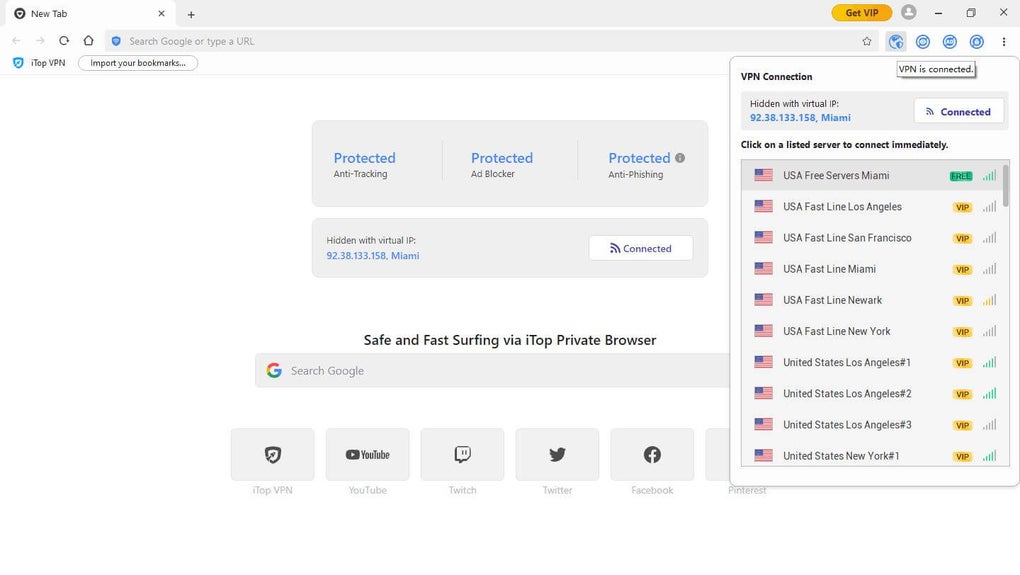
After opening iTop Private Browser, you’ll see a small VPN toggle icon in the top‑right corner of the toolbar. Click the icon to enable the VPN; the icon turns green, indicating an active encrypted tunnel. You can then select a server location by tapping the “Server” button, which opens a list of countries and cities. Choose the desired location, and the connection will be established within seconds. The browser automatically routes all traffic through the VPN, and you can verify the active IP address by visiting a “what is my IP” site.
Ad Blocker & Security Settings
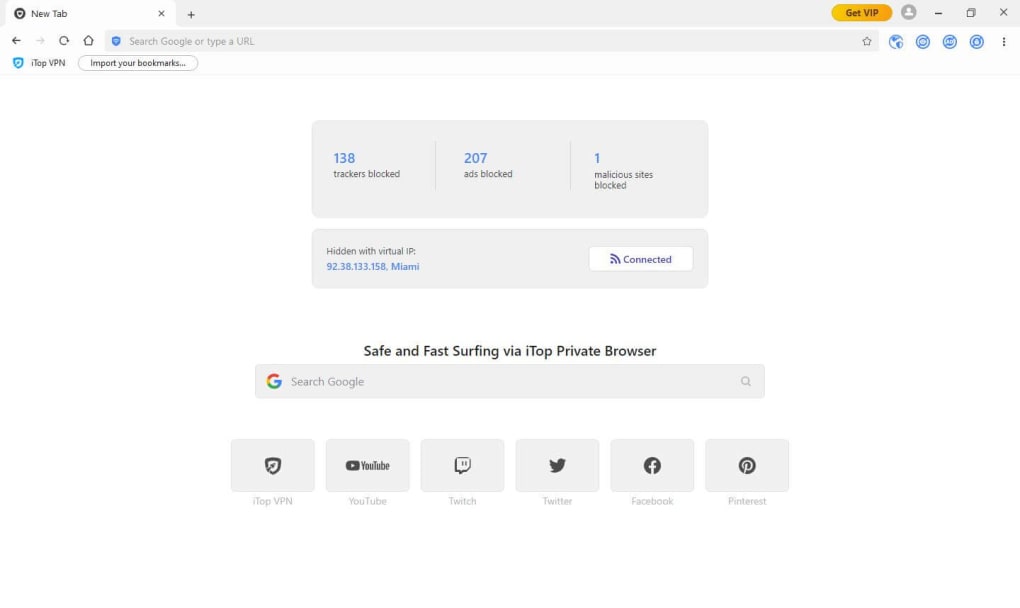
The ad blocker can be turned on/off using the shield icon next to the VPN toggle. When enabled, the browser blocks known ad networks and trackers, resulting in a smoother browsing experience. For phishing protection, the browser checks each URL against a global threat database; suspicious sites trigger a warning dialog, allowing you to proceed at your own risk or return to safety.
All settings are accessible via the three‑dot menu in the upper‑right corner. Here you can adjust default search engine, clear browsing data, and manage privacy preferences. Because the interface is intentionally minimal, most users won’t need to dive deep into the settings—one‑click toggles handle the majority of privacy needs.
Compatibility, System Requirements & FAQ
Supported Platforms: Windows 10/11 (64‑bit), macOS 10.13 or later, Android 7.0+, iOS 12.0+. The application is optimized for both desktop and mobile environments, providing a consistent experience across devices.
System Requirements
- Minimum 2 GB RAM (recommended 4 GB for smoother performance on Windows).
- At least 150 MB of free storage for installation and future updates.
- Internet connection for VPN server selection and real‑time threat database updates.
Frequently Asked Questions
Is iTop Private Browser completely free?
Yes, the browser and its built‑in VPN are offered at no cost. There are optional premium upgrades for faster VPN servers, but the free tier provides ample security for everyday browsing.
Can I use the VPN while browsing other apps?
No. The VPN is scoped only to iTop Private Browser. This design keeps the browser lightweight and ensures that only your web traffic is encrypted, leaving other apps unaffected.
How does the ad blocker affect website functionality?
The ad blocker uses a curated filter list that targets known ad networks and trackers while preserving essential site elements. In rare cases, a site may appear broken; you can temporarily disable the blocker for that domain via the shield icon.
Is my browsing data logged by iTop?
iTop Private Browser adheres to a strict no‑logs policy. The VPN does not retain connection timestamps, IP addresses, or browsing history. Only anonymized performance metrics are collected to improve service stability.
What should I do if the VPN connection fails?
First, check your internet connection. If it’s stable, try switching to a different server location. You can also restart the browser or reinstall the app. Persistent issues are addressed via the in‑app “Support” section.
Pros and Cons
- Pros:
- Integrated VPN eliminates extra apps.
- Military‑grade AES‑256 encryption.
- Ad blocker and anti‑phishing built in.
- Easy one‑click toggles for privacy features.
- Free with optional premium upgrades.
- Cons:
- VPN scope limited to the browser only.
- Fewer customization options compared to Chrome or Firefox.
- Free servers may experience occasional congestion.
Conclusion & Call‑to‑Action
iTop Private Browser delivers a compelling blend of security, privacy, and simplicity for users who want an all‑in‑one solution without juggling multiple applications. Its built‑in VPN, ad blocker, and anti‑phishing engine work together to create a safe browsing environment that is especially valuable in today’s surveillance‑heavy internet landscape. While the feature set is intentionally minimalist, it covers the core needs of privacy‑conscious users and does so without charging a dime. If you’re looking for a hassle‑free way to protect your data, bypass geo‑restrictions, and enjoy a cleaner web experience, iTop Private Browser is definitely worth a try.
Ready to surf the internet securely? Download iTop Private Browser now and activate the VPN with a single click. Experience the freedom of an uncensored, ad‑free web while keeping your personal information out of the hands of prying eyes.
Overall Rating: 4.5/5 – A robust, free privacy browser that consolidates essential security tools into a single, user‑friendly package.







